In most cases, you can easily locate and find your iPhone ringtones on your device, especially for those ringtones that come with your iPhone. In other words, we can call them iPhone default ringtones. For those iPhone ringtones, you can find them at great ease on your iPhone. Ringtones are stored in .m4r format in your iPhone, thus many people would call them m4r ringtones. Where are m4r ringtones, and how to find them in normal situation?
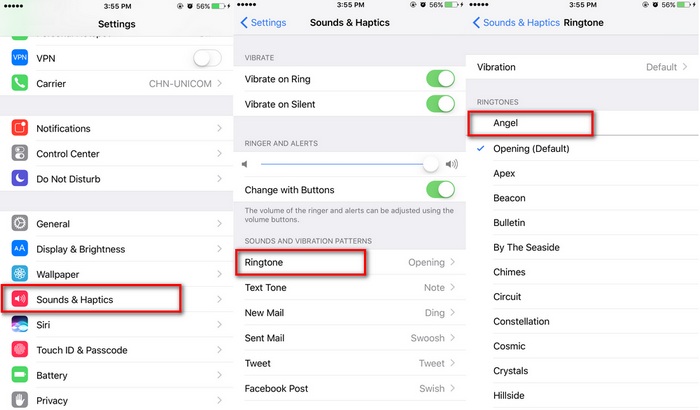
Go to Settings on your iPhone.
Choose Sounds & Haptics, and you can find Ringtone and Text Tone under SOUNDS AND VIBRATION PATTERNS.
Click Ringtone to enter a new page where you can find a ringtone list containing all detectable iPhone ringtones.Sponsor Ads:
Gihosoft Free iPhone Data Recovery is a professional iPhone Data Recovery software to get back all your lost text message, photo, video, call history, note, contact and more from iPhone/iPad/iPod Touch.For now, check:
Must Read:Jihosoft iTunes Backup Unlocker


